Smilemint: Elegant Script Font for Web Design
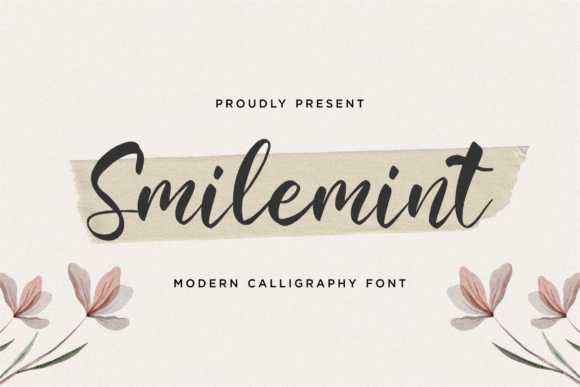
As a web designer, I always look for fonts that bring both beauty and functionality to digital projects. Smilemint is one such script font that offers a refined, elegant presence while maintaining readability across various design contexts. Its delicate curves and flowing lines make it ideal for headers, logos, and decorative elements where visual appeal matters.
Smilemint’s personality is soft yet confident. It balances the warmth of a handwritten script with the precision of a well-crafted typeface. This makes it perfect for brands that want to convey sophistication without sacrificing clarity. Whether used in a landing page headline or a social media graphic, Smilemint adds a touch of class that resonates with modern audiences.
Using Smilemint in Web Design
When designing a website, the choice of typography plays a critical role in shaping user experience. Smilemint excels as a display font, particularly in hero sections, call-to-action buttons, and section headings. Its flowing style draws attention and guides the eye naturally, making it an excellent choice for headlines that need to stand out.
In a creative portfolio, Smilemint can be used for project titles or artist names, giving the site a personalized, artistic feel. For a boutique online store, it works well on banners and product headings, adding a sense of luxury and exclusivity. On a coaching website, it can enhance the tone of a welcome message, reinforcing trust and professionalism.
For a course sales page, using Smilemint in the main title can create an inviting, approachable vibe that encourages users to explore further. In blog headers, it adds a unique visual identity that differentiates the content from standard layouts.
Readability and Visual Hierarchy
While Smilemint is a script font, it maintains good legibility even at smaller sizes. However, it’s best suited for short phrases rather than long blocks of text. When used in headers or captions, it enhances visual hierarchy by creating contrast against more neutral body fonts.
On mobile screens, it’s important to ensure that Smilemint remains readable. Avoid using it in small button text or on dark backgrounds without proper contrast. Instead, pair it with a clean sans serif font for body copy to maintain balance and clarity.
When overlaying text on images, use a subtle background or border to make the font pop without overwhelming the design. This helps maintain focus and ensures that the message is easily absorbed by users scanning the page.
Font Pairing and Brand Identity
Smilemint pairs beautifully with sans serif or serif fonts to create a balanced typographic system. For example, pairing it with a simple sans serif like Open Sans or Lato can provide a modern, professional look. Using it alongside a serif font like Georgia or Playfair Display can evoke an editorial or luxury aesthetic.
For a more casual or creative brand, Smilemint can be paired with a handwritten font to add a personal touch. This combination works well for blogs, social media graphics, or branding materials that aim to feel authentic and relatable.
When building a brand identity, consider how Smilemint aligns with your overall visual language. Its elegance makes it suitable for fashion, wellness, lifestyle, or artisanal brands looking to communicate refinement and care.
Practical Applications for Digital Creators
Smilemint is ideal for a variety of digital projects. For a digital product creator, it can be used in app screens, landing pages, or UI elements to add a polished, custom feel. In a SaaS product, it can enhance the header of a feature section, drawing attention to key benefits.
Online store owners can use Smilemint in banners, product tags, or promotional messages to create a cohesive and appealing shopping experience. For a blogger, it can serve as a header font that sets the tone for each post, reinforcing brand consistency across the site.
When working on client projects, it’s essential to check the licensing terms of Smilemint. Ensure that the font is available in webfont formats and that it supports the necessary weights and language characters for your target audience.
Final Considerations for Web Designers
As a web designer, I recommend testing Smilemint in different layout scenarios before finalizing its use. Experiment with spacing, size, and color to find the optimal presentation for each design. Remember that while Smilemint is visually striking, it should always support the user’s ability to read and navigate the site effectively.
Whether you're working on a creative portfolio, a product landing page, or a branded web experience, Smilemint offers a versatile and stylish option for enhancing your digital work. Its blend of elegance and practicality makes it a valuable addition to any designer’s toolkit.